Dear HarmonySite administrator,
Here is the latest set of upgrades for your HarmonySite...
1. Mailing lists can now be for multiple groupings and/or teams
Up until now, when you created a mailing list, you nominated one member grouping or one committee/team (or neither) that the mailing list would be for. Now it's possible to select multiple member groupings, or multiple committees/teams, or even a combination of both.
So now it's possible to have a single mailing list for (for example) Tenors AND Basses combined.
Or a single mailing list for Regular Members AND your Board of Directors combined.
Update any mailing list record, and you'll see the revised selections.
2. New page to duplicate library items
This is regarding the "Libraries" system, where you can keep track of all the items that your group keeps in inventory, plus the details of which members the items are loaned out to.
For each item that you loan out (e.g. a copy of printed sheet music, or a "purple jacket size L", etc) you often have MANY of them, all the same. The only difference between each is that you've numbered each one. For example, if you had 20 purple jackets, you would likely have written the numbers 1 through 20 on the TAG of the jacket. So you need 20 identical items in the library database - the only difference between each one being the NUMBER (1-20). Up until now, each of the 20 database records would have needed to be added MANUALLY (big job!). Now, you can click the icon circled in red below to create multiple copies at once...

It is necessary for the FIRST item to have a number (e.g. 1).
Click the icon, then fill in the blanks on the next page...
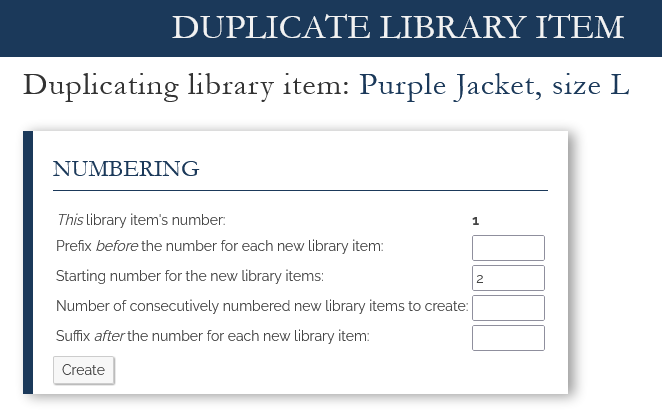
Note that the "prefix" and "suffix" are optional.
3. Event Availability can be "frozen"
It's now possible to set a date after which no members can indicate their availability for an event...
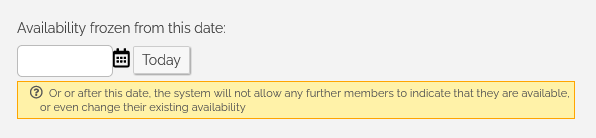
As the help text says, on or after this date, the system will not allow any further members to indicate that they are available, or even change their existing availability.
4. The "Cash" payment method can now be reamed to anything you want
For all shopping cart transactions, there's an optional payment method called "Cash". To enable it, you have always been able to simply type some instructions into the big box...
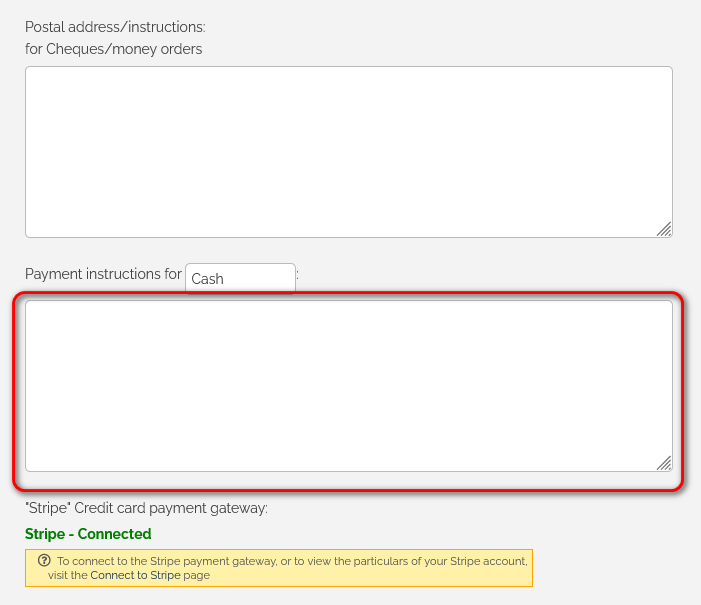
Now it's also possible to RENAME that "Cash" option to anything else you want, such as "Venmo". Just type a different name into the box that currently has "Cash" in it, and then add the relevant instructions in the big box below, for how to pay using that payment method.
To find these settings, click the little "cog" icon in the top-right corner, then click the cog icon next to "HarmonySite". Then click the "Payments" tab.
5. Member Longevity Report improvements
As you may know, your HarmonySite has a "Member Longevity" report. The link is on the Admin Dashboard. We've made two improvements to this report...
- If you are part of a larger "parent" organisation, such as BHS, SAI, Harmony Inc, BHA, BNHZ, etc, and that organisation also uses HarmonySite, AND that organisation has membership records for each member, then the report will show you BOTH sets of longevity details. So you can see how long each person has been a member of your group, AND how long they've been a member of your parent organisation. There's a new selector at the top of the Member Longevity report to allow you to switch between them. If you don't see a selector, then your parent organisation doesn't use HarmonySite, or doesn't have membership records for each member.
Note that for the Longevity Report to be useful, each member must have a "Registration Date" entered into their membership record. - There's now a new field on every membership record, called "Effective registration date". This is sometimes needed if a member has resigned and rejoined multiple times. HarmonySite can only store ONE resign-rejoin pair of dates. So if a member has resigned and rejoined multiple times, HarmonySite can't calculate the member's longevity. So you can enter an "effective registration date", which you've calculated yourself, to reject their TRUE longevity in the Longevity Report, accounting for all the gaps.
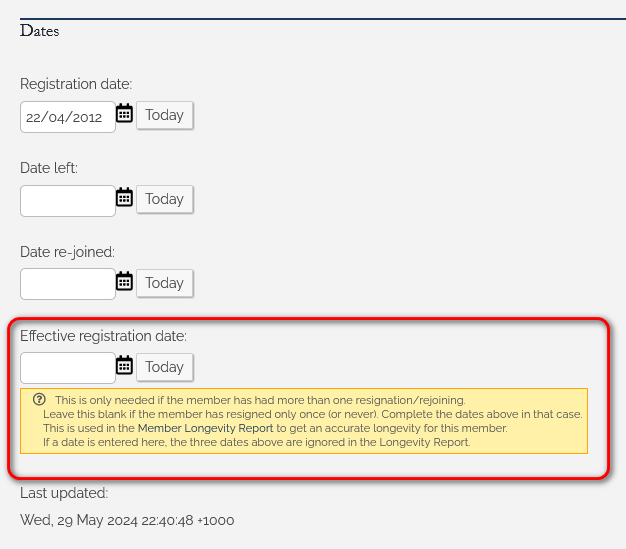
You would leave this new field BLANK if the member has resigned only ONCE (or never). If that's the case, simply enter a "Date left" and a "Date re-joined". If you enter an "Effective registration date", all three dates above are ignored in the Longevity Report.
That's all for now.
In harmony,
Mark Virtue
HarmonySite
Australia
+61 2 8005 4277 (Australian number)
In North America, call: 1-415-651-7009 (San Francisco number)
Skype name: mvirtue